New to building websites? Then you've probably seen a word like merge and had no idea what it meant. I didn't either.
This page explains those words in plain English. Each one gets a short meaning, an everyday comparison, and a link to a post where you'll see it used. You don't need to know any code. It's written for creators first, and it works just as well for VAs. Bookmark it and come back whenever a word trips you up.
AI words
AI model. The AI itself, the "brain" that reads what you write and answers. Claude is a family of models made by a company called Anthropic; ChatGPT runs on OpenAI's models. Like: the engine in a car. Different apps can put the same engine in a different body.
Prompt. Whatever you type to the AI: a question, a request, a pasted document. Like: the brief you'd give a freelancer. A clearer brief gets better work back.
Chatbot. An AI you talk to in a chat window. It answers, and you go do the thing yourself. Like: a very smart friend on the other end of a text thread.
AI assistant. The same AI, but connected to some of your apps, so it can also do work there, inside rules you set. Like: that friend, now with the keys you chose to hand over. (The full difference.)
Project. A workspace in Claude for one area of your work, with its own instructions, files and chats. Like: a separate desk for each client or each site, with that job's notes already on it. (How mine work together.)
Instructions. The standing notes your AI assistant reads every time, in a project or a task: what it's for, your rules, where things live. Like: the handover doc you'd write for a new hire. You write it once.
SOP (standard operating procedure). Written, step-by-step instructions for a job that gets done over and over, so anyone can do it the same way every time. Many VAs keep one for each client's recurring jobs. A scheduled task's instructions are an SOP written for an AI assistant. Like: a recipe card taped inside the cupboard.
Connector. A signed-in link between your AI assistant and one of your apps, like Google Sheets or Canva, so it can find things and do work there. Like: a key to one room, not the whole house. (More on connectors.)
Browser extension. A small add-on to your web browser. Claude in Chrome is one: it lets the AI assistant click around websites you're signed in to. Like: letting someone use your laptop while you watch.
Scheduled task. A job your AI assistant runs on its own at a set time, like every weekday morning. Like: an alarm clock that also does the chore when it rings.
Agent. An AI that takes several steps on its own to reach a goal, deciding what to do next as it goes. Most of what this site teaches is the AI-assistant kind: you set the rules, it follows them, you approve the important parts.
Standing yes. Not an industry term, just what I call it: a kind of job I've said yes to in advance, so my AI assistant doesn't have to ask each time. The idea is old: businesses call it pre-approval. Like: telling a house-sitter "you can always water the plants." (My five standing yeses.)
Website words
These come up the moment your AI assistant starts building your site. The comparison running through most of them is a Google Doc.
Repo (repository). The folder that holds every file of your website, plus the history of every change ever made. Like: a shared Google Drive folder that remembers every version.
GitHub. The website where repos live. Free for what most of us need. Like: Google Drive, but for website files.
Commit. Saving a change, with a short note saying what changed. Like: "Save version" with a label, so you can go back to it later.
Branch. A separate copy of the website files where changes can be tried without touching the real site. Like: duplicating a doc to try a rewrite, while the original stays as it is.
Pull request (PR). A proposed change, with a summary and a preview, waiting for your yes. Like: a doc in suggesting mode: here's what I'd change, want it?
Merge. Saying yes to a pull request, so the changes join the main version of your site. It's the green button at the bottom of the pull request on GitHub. On my site it says Squash and merge, and the small arrow beside it switches to Create a merge commit or Rebase and merge. Any of the three adds your change to the main version. Like: clicking "accept all suggestions."
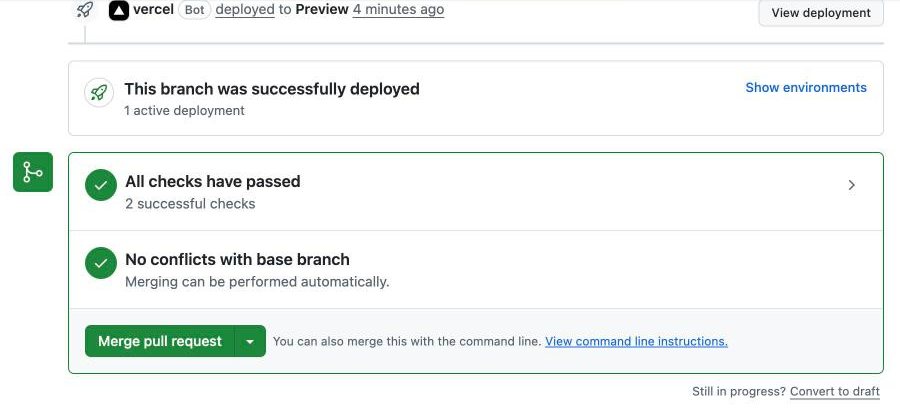
The green checks above the button mean the site built without errors, so it's safe to merge. (More on GitHub, and how I use it, in my tech stack post.)
Main. The main branch: the official version of your site's files, the one that goes live. Like: the final draft everyone works from.
Build. Turning your website files into the finished pages a browser can show. It happens automatically, and if something's broken, the build fails before anything goes live. Like: baking. If the recipe has a mistake, it doesn't come out of the oven.
Deploy. Putting the newly built version of your site on the internet. On Vercel (the host my sites use), merging a change deploys it automatically within a minute or two. Like: putting the new window display out.
Preview link. A private web address showing your site with a proposed change, before you merge it. Like: a dress rehearsal only you can see.
Production (or "live"). The real site, the one your readers see. Like: opening night.
Host. The company whose computers serve your website to visitors, like Vercel. Like: the landlord for your site's storefront.
Domain. Your address on the internet, like automateherlife.com. You rent it by the year. Like: your street address.
DNS. The settings that tell the internet where your domain's website and email actually live. Like: the contacts entry that turns a name into a phone number.
Sitemap. A list of every page on your site, made for search engines. Like: a table of contents for Google.
Meta description. The one or two sentences search engines show under your page's title. Like: the blurb on the back of a book.
Alt text. A short description of an image, read aloud by screen readers and used by search engines. Like: a caption for someone who can't see the picture.
Newsletter words
These are Kit's words (Kit is the newsletter tool I use), but most newsletter tools have the same ideas.
Broadcast. A one-time email to your list, like this week's newsletter.
Sequence. A set of emails sent automatically, in order, after someone signs up. Like: a welcome series that runs itself. (On Kit, sequences come with the paid plans; the free plan sends broadcasts.)
Form. The signup box on your site where people type their email.
Tag. A label on a subscriber, so you know what they signed up for. Like: a sticky note on their contact card.
Double opt-in. New subscribers get a confirmation email and click a button to say "yes, it was me" before they're on your list. Like: an RSVP. (How to set yours up.)
Sender (from address). The name and email address your newsletter says it's from.
Verified sending domain. Proof to Gmail and other inbox providers that your newsletter tool is allowed to send email for your domain. Fewer emails in spam.
Deliverability. How many of your emails actually reach the inbox, instead of spam or nowhere.
The one rule behind all of these
You don't need to remember any of this. Next time your AI assistant uses a word you don't know, ask it: "explain that like I've never built a website." It won't mind explaining twice. The decisions stay yours; the vocabulary catches up.
Missing a word? Join the newsletter and reply to any email with it, so this list can grow.