Here's a funny problem I didn't expect. Once my AI assistant was doing real work for me, it started asking me about everything. Can I merge this tiny fix to the website? Can I schedule these pins? Can I close this duplicate row? Yes. Yes. Yes. Every yes took a few seconds, and they piled up into a little stream of interruptions every day.
A good human assistant doesn't do that. You tell them once, "you can always book my dentist appointments, just put them on my calendar," and they never ask again.
So I did the same thing with my AI assistant. I call them standing yeses: a short list of jobs it can do without asking me first, as long as it follows the rules I set and tells me about them afterward. Everything else still waits for me.
As I put it: "certain things can be totally hands off, after you make certain decisions, rules etc." That's the whole idea. I make the decisions once. After that, the busywork runs.
The whole thing in one sentence
I wrote down which boring, undoable jobs my AI assistant may do on its own, the rules for each one, and the things it must always ask me about, and it lists everything it did on its own in my Friday summary.
My five standing yeses
These are mine, set on October 14, 2026. Yours will look different, and that's the point.
1. Small website fixes that are only code. My sites live in a place called GitHub, where every change waits as a "pull request" (a proposed change) until someone clicks Merge. My assistant may merge one on its own only if all of these are true:
- it changes only code, layout, styles, settings or pictures the assistant made itself
- it adds or changes no words that I (or my husband Jake) wrote, and makes no post public
- it doesn't touch my domain settings, payments or passwords
- the site's own checks pass and the preview works
After merging, it checks the live site shows the new version. If something looks off, undoing it is one click (reverting the change).
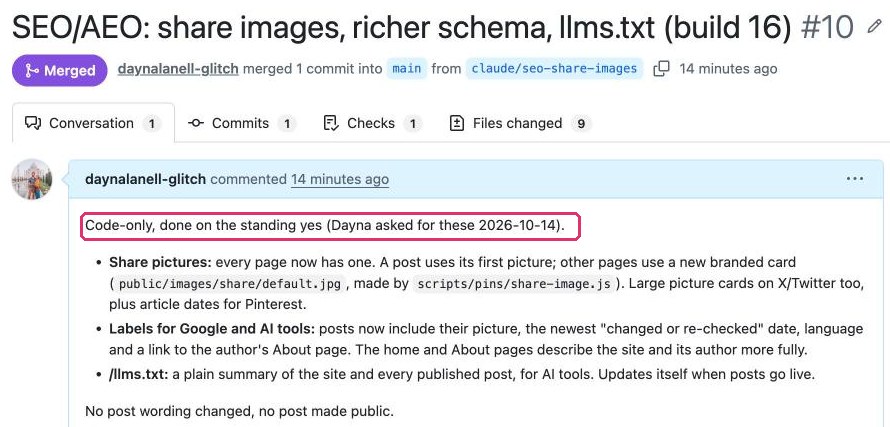
The same day I set this up, I asked for better share pictures and search labels on this site. My assistant made the change, merged it, and checked it was live, without a single "can I?" in between.
2. Pinterest batches that follow my playbook. My Pinterest rules live in one document: my pin designs, my wording, links only to my own posts, at most 3 pins per post a month. If a batch follows that playbook, my assistant saves, uploads and schedules it without waiting for my "go". Two safety rules: the first pin goes live no sooner than 2 days after scheduling, and a preview of the batch goes at the top of my next to-do list, so I can always say "stop" or change a pin.
3. Test signups on my own forms. Testing that a newsletter signup works means signing up with a test email address. My assistant can do that on its own forms with test addresses, then unsubscribes those test addresses so they don't count as real readers.
4. Tidying my tracker. My whole life runs on one spreadsheet (I wrote about my Command Center tracker here). My assistant may close duplicate rows, close rows that later work made pointless (with a note saying why), and move repeating tasks to their next date.
5. The behind-the-scenes words on my websites. Every page has a short description that Google shows under the title, every picture should have alt text (a short description of the image for people using screen readers, and for search engines), and my sites have an llms.txt file (a plain summary that AI tools read). My assistant writes these from the post itself, in the site's voice, and puts them live. On the site where I share my poems and essays, it only uses my own opening lines, never new words. And on Jake's site, he still says yes first.
What always needs my yes
This list matters just as much as the first one. My assistant must always ask before:
- anything in my words, or Jake's (other than those behind-the-scenes descriptions). It can draft, but I decide what goes out with my name on it.
- money. Payments, purchases, plan changes.
- messages or emails to real people.
- publishing a post.
- changes to Jake's YouTube channel.
- deleting anything that isn't its own test data.
There's one gray area I kept for myself on purpose: a small spacing fix to one of my poems technically counted as "only code," but it changes how my writing looks, so it stays with me. When in doubt, it's mine.
How I hear about it
Every Friday, my weekly summary has a section called "Done on standing yes": a short list of everything my assistant did on its own that week. I skim it in a minute. If I ever don't like something, I say so and the rule gets tighter.
Everything that does need my yes waits for one weekly approval window: Monday mornings, about 30 minutes, one list. Only truly urgent things (a deadline within 3 days) come to me sooner. I'm trying Monday for two weeks to see if it feels right.
How to write your own standing yeses
Step 1: Notice what you keep saying yes to
For one week, every time your AI assistant asks you something and you say yes without thinking, write it down. A note on your phone is fine. Those are your candidates.
Step 2: Sort them with three questions
For each one, ask:
- Is it boring? If you'd never want to see it, it's a good candidate.
- Can it be undone easily? A scheduled pin can be deleted. A sent email can't be unsent.
- Can it be checked against rules? "Follows my pin playbook" can be checked. "Sounds like me" can't.
Three yeses means it can be a standing yes. Anything with your voice, money, other people or deleting goes on the "always ask" list.
Step 3: Write each one with its guardrails
A good standing yes has four parts: what the assistant may do, only if (the conditions), how to undo it, and how you hear about it. Here's a version you can copy and change:
Standing yeses. You may do these without asking me first, then list each one in my Friday summary under "Done on standing yes":
- [The job, for example: tidy my tracker: close duplicate rows and rows that later work made pointless, with a note saying why, and move repeating tasks to their next date.] Only if [the conditions].
- [Another job.] Only if [the conditions]. Undo: [how].
Everything else still needs my yes, and these ALWAYS do: anything in my words, anything that costs money, messages to real people, publishing, and deleting anything that isn't your own test data. When in doubt, ask.
Start with one or two. You can always add more once you trust it.
Step 4: Put them where your assistant reads them every time
In Claude, open the project your assistant works in (mine is called Command Center). On the right side, find Instructions and click Edit. A window called Set project instructions opens. Paste your standing yeses at the end and click Save instructions.
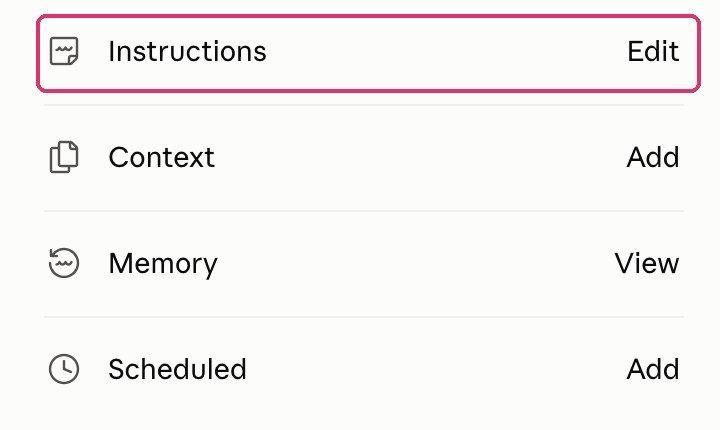
If your assistant works in more than one project, paste the same block into each one. I have a project for each website plus my Command Center, so mine lives in six projects.
Then look for any older rule in those instructions that now says the opposite (like "always ask before merging anything") and update it, so your assistant doesn't get two different answers.
Step 5: Add the Friday list
Add one line to whatever weekly summary your assistant writes you: "List everything you did on a standing yes this week under 'Done on standing yes'." No weekly summary yet? Just ask in a chat every Friday: "What did you do on a standing yes this week?"
Step 6: Check in after two weeks
Read your Friday lists. Too cautious? Add a standing yes. Something you didn't love? Tighten the rule or move it back to "always ask."
Why this works
A standing yes isn't the AI deciding for you. It's you deciding once, clearly, instead of a hundred times, half-distracted. Your ideas, your voice, your money and your relationships stay yours. The busywork gets a rulebook and runs on its own.
Want my whole setup, step by step? Join the newsletter. You'll also get my free Command Center tracker template, with a ready-made spot for your standing yeses.