If you run a blog, or a YouTube channel with a website next to it, you can check whether AI answer tools are citing you in two places. Bing Webmaster Tools has a free "AI Performance" report that counts how often Microsoft Copilot used one of your pages as a source. And your website analytics show whether anyone actually clicked over to you from chatgpt.com, perplexity.ai or copilot.microsoft.com.
Below is how to set up both, and what I saw the first time I looked, on my husband Jake's running blog. Spoiler: the numbers are tiny and it's very early. But they're real.
(If you're a virtual assistant who reports numbers to clients, this is a nice new line for your monthly report. Same steps, on your client's site, with their sign-in.)
Why this matters now
More and more people ask an AI chat a question instead of typing it into Google. When that AI tool answers, it often shows a few sources: little links under or beside the answer. Being one of those sources is called a citation.
It's a bit like being quoted in a magazine. Some readers click through, most won't, but the AI tool decided your page was worth trusting.
Your post, your photos, your experience and your voice are what get cited. The AI tool didn't write any of it. It just went looking for someone who knew, and found you.
Part 1: The Bing AI Performance report
What it is
Bing Webmaster Tools is Microsoft's free dashboard for website owners (the Bing version of Google Search Console). In February 2026, Microsoft added a report called AI Performance in public preview. Bing's announcement says it shows how often your pages are cited in Microsoft Copilot, AI-generated summaries in Bing, and "select partner integrations" (Bing doesn't name the partners).
It's the only report I know of, as of October 2026, where the company behind an AI answer tool tells you "we cited your site this many times."
What about ChatGPT?
There's no ChatGPT version of this report. But it's widely reported that ChatGPT's search leans on Bing's index (Search Engine Land wrote in 2024: "ChatGPT uses Bing's index, so if Bing doesn't have your page, neither does ChatGPT"). OpenAI hasn't spelled out the details, so I treat it as a strong hint, not a fact. Either way, getting into Bing is cheap insurance for ChatGPT too.
Step 1: Add your site to Bing Webmaster Tools
If your site is already in Google Search Console, this is the easy road, and it's how Jake's site went in. The steps, from Bing's own announcement of the Import feature:
- Sign in to Bing Webmaster Tools.
- On the My Sites page, click Import.
- Sign in to Google Search Console and click Allow, so Bing can see your verified sites and sitemaps. (A sitemap is a list of every page on your site, made for search engines.)
- Tick the sites you want and click Import.
Imported sites are verified automatically, so you don't have to prove you own them all over again. Your sitemap comes along too.
Not in Google Search Console yet? Do that first, or use one of Bing's other ways to prove the site is yours, such as a meta tag or a DNS record.
Step 2: Open AI Performance
Once your site is in, choose it from the site menu at the top left. In the left-hand menu you'll see Home, Search Performance, then AI Performance with a small BETA tag (beta means it's still being tested and might change).
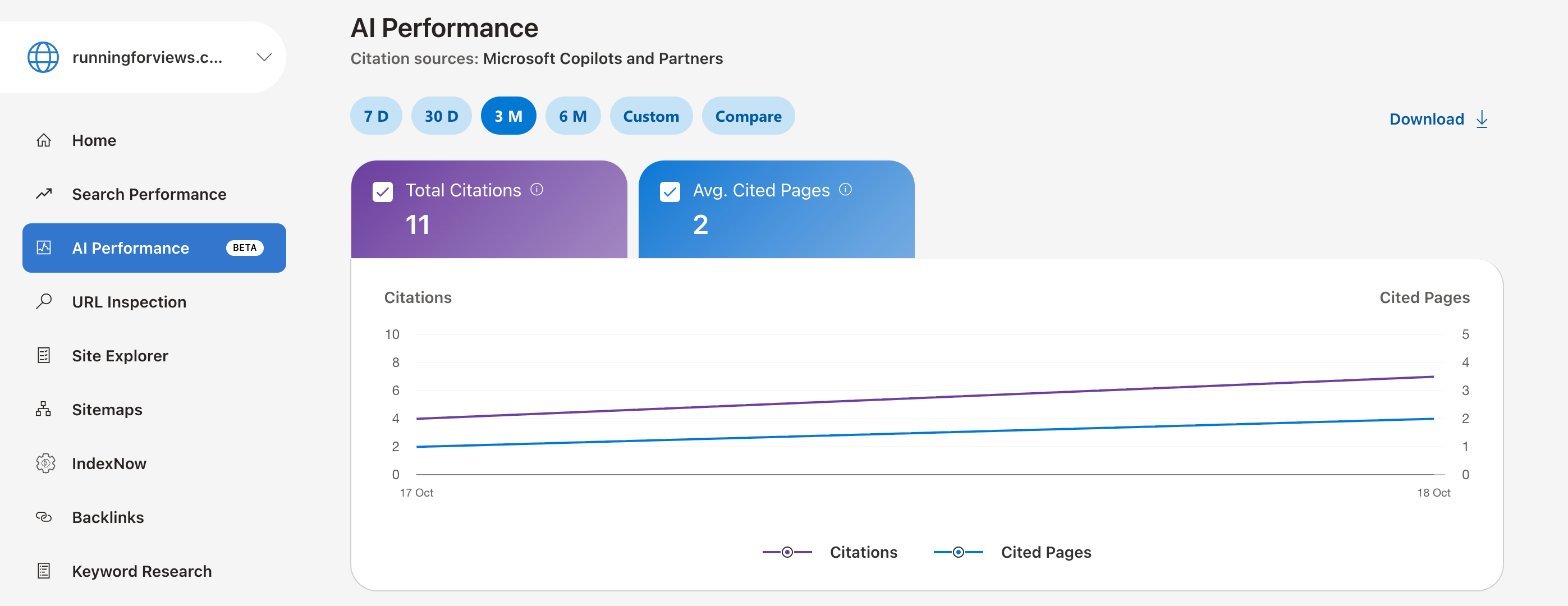
Here's what's on the screen:
- Under the title: Citation sources: Microsoft Copilots and Partners.
- Date buttons: 7 D, 30 D, 3 M, 6 M, Custom and Compare, with a Download link on the right.
- Two cards: a purple one, Total Citations (how many times your pages were shown as a source), and a blue one, Avg. Cited Pages (Bing's definition: the average number of different pages from your site cited per day).
- A chart of both, day by day.
- Below the chart, List By with two buttons: Grounding Queries and Pages.
Grounding queries are the search phrases the AI tool used behind the scenes when it went looking for sources. They're not exactly what the person typed into Copilot; they're Bing's version of it. This is the gold, because it tells you which questions your blog is answering. Pages shows which of your posts got cited.
What I saw on Jake's site
Jake's running site, Running for Views, went into Bing Webmaster Tools on October 19, 2026, imported from Google Search Console. The report already had numbers going back two days:
- October 17: 4 citations, 1 cited page. All four went to his post about setting up an Apple Watch heart rate alert during a workout.
- October 18: 7 citations, 2 cited pages.
- Total so far: 11 citations, 2 average cited pages.
The Grounding Queries list said "No data available." There's a note on the page that explains why: the data "represents a sample of overall activity" and "results may be refined as additional data is processed." In other words, it fills in over time.
So, honestly: 11 is a small number, it's two days of data, and it's a beta report showing a sample. What I find interesting is that the Apple Watch post was also the most-visited page on Jake's site in the same days. The post people find most useful is the one the AI tool reached for first: one clear question, answered well.
Part 2: AI referrals in your analytics
A citation is not a click. Bing's report counts how often your page was shown as a source, not how many people visited. To see visits, look at your analytics for referrers (the website a visitor was on right before they landed on yours).
The AI ones to look for:
- chatgpt.com
- perplexity.ai
- copilot.microsoft.com
- gemini.google.com
- claude.ai
Visits from those sites are what I call AI referrals.
In Vercel Web Analytics
Jake's site runs on Vercel (I explain what that is in my tech stack post). In Vercel, open your project, click Analytics in the sidebar, and find the panel with a Referrers tab (next to UTM Parameters). Each row is a website with its number of visitors.
In Google Analytics, WordPress stats or any other tool, the idea is the same: find the list of referring sites and look for those five names.
What I saw
Web Analytics only went on for Jake's site around October 18, so this is a few days, not a month: 69 visitors and 85 page views. The Referrers panel showed google.com (10), bing.com (7), duckduckgo.com (4) and youtube.com (3). No AI referrals yet. Not one visitor from chatgpt.com or the others.
So right now: Copilot is citing Jake's site, but nobody has clicked over from an AI tool yet. That's exactly why it's worth checking both numbers.
What about Google?
Google's AI Overviews and AI Mode show up in Google Search Console, but mixed into your normal search numbers. In June 2026, Google announced separate "generative AI" performance reports in Search Console, and as of October 2026 it's still rolling them out to some sites, not all. If you don't have it, there's nothing to switch on; just wait.
How I keep an eye on it without thinking about it
I don't open these reports every day. Every Monday morning, a scheduled task (a job my AI assistant runs on its own, at a set day and time) collects the week's numbers into my Command Center tracker. I decided once which numbers matter and where they go. The AI assistant does the copying.
You don't need any of that to start. A phone reminder that says "Monday: check Bing AI Performance and referrers" works fine. Write down the two numbers each week, and after a month you'll see which posts the AI tools trust.
Your ten-minute checklist
- Make sure your site is in Google Search Console.
- Add it to Bing Webmaster Tools with Import (or verify it another way).
- Wait a few days, then open AI Performance and note Total Citations.
- Check Grounding Queries and Pages once they fill in.
- In your analytics, check Referrers for chatgpt.com, perplexity.ai, copilot.microsoft.com, gemini.google.com and claude.ai.
- Write both numbers down every week.
And keep your posts accurate. An AI tool that cites an outdated tutorial isn't doing you any favors, which is why I keep every tutorial here on a re-check schedule.
I'll share how Jake's numbers grow (or don't) as the weeks go by. Join the newsletter if you want the update, plus the rest of my setup, step by step.